
Quick summary
Fare alerts work by repeatedly scanning airline pricing APIs and third-party fare aggregators, then notifying you when a price drops below a threshold you've set. The technology sounds simple, but the gap between a basic price tracker and something genuinely useful comes down to scan frequency, data sources, and how smart the alert logic is. This article breaks down exactly what's happening under the hood — and why most free tools miss the deals that matter.
The thing most people get wrong about fare alerts
People assume a fare alert is basically just a saved search that runs on a timer. Set it, forget it, get an email when prices drop. And at the most basic level, that's not wrong. But it's like saying a car is basically just a box that moves. Technically accurate, practically useless as a description of what separates a good one from a bad one.
I've been covering premium air travel for twelve years. I've watched the fare monitoring space go from a handful of clunky email newsletters to a genuinely sophisticated category of tools, some of which are very good and some of which are essentially just noise generators. The difference isn't obvious from the outside. It's in the mechanics — how often they look, what they're looking at, and what they decide is worth telling you about.
So let me walk through what's actually happening when a fare alert fires.
Where the price data comes from
This is where most explainers stop being honest. The romantic version is that a fare alert tool is watching airline websites in real time, constantly refreshing like some kind of obsessive bargain hunter. The reality is more complicated.
Airlines don't publish their prices in one place. They distribute fare data through a network of Global Distribution Systems — the big ones being Amadeus, Sabre, and Travelport. These GDSs are the same systems that travel agents and online booking sites plug into. A fare alert tool that's serious about coverage needs access to GDS data, not just screen-scraped airline dot-coms.
But GDS access isn't cheap or easy to get. It requires commercial agreements, technical integration, and ongoing costs. This is one of the main reasons most consumer-grade fare alert tools are working with a subset of the available data — often pulled from aggregators like Google Flights or Kayak rather than directly from the source. That's not automatically bad, but it does mean there's a lag. And in fare terms, lag kills deals.
Airlines also have their own direct channels, and sometimes the cheapest fare exists only on the airline's website for a window of hours before it propagates to the GDS. A tool that's only watching aggregator data will miss those entirely.
How often should a fare alert actually scan?
Scan frequency is the metric nobody talks about when they compare tools, and it's arguably the most important one for catching premium cabin deals.
Here's why it matters so much for business class specifically. Discounted business class fares — the ones that drop from $4,000 to $1,400 — are often inventory corrections. An airline has unsold seats close to departure. A corporate contract releases a block of held inventory. A fare filing error goes unnoticed for a few hours before someone catches it. These windows can be as short as 90 minutes.
If your fare alert tool scans once every 24 hours, you will never see those deals. By the time it runs its next check, the fare is gone. You'll get an email about a price that no longer exists, which is arguably worse than no email at all because it trains you to ignore the alerts.
The 24-hour scan problem
Most free fare alert tools — including the alerts built into Google Flights — run on scan cycles that range from a few hours to once daily. For economy fares on popular routes, that's often fine. For business class, where the deals are fleeting and the inventory is thin, it's usually not enough.
BusinessClassSignal scans 800+ business class routes twice daily at minimum, with more frequent passes on high-volatility routes around schedule change periods and close-in windows. That's a meaningful difference. The full breakdown of how the monitoring system works is on the site if you want the specifics, but the short version is: frequency matters, and we built the scan schedule around the patterns of when business class fares actually move.
What triggers an alert — and what doesn't
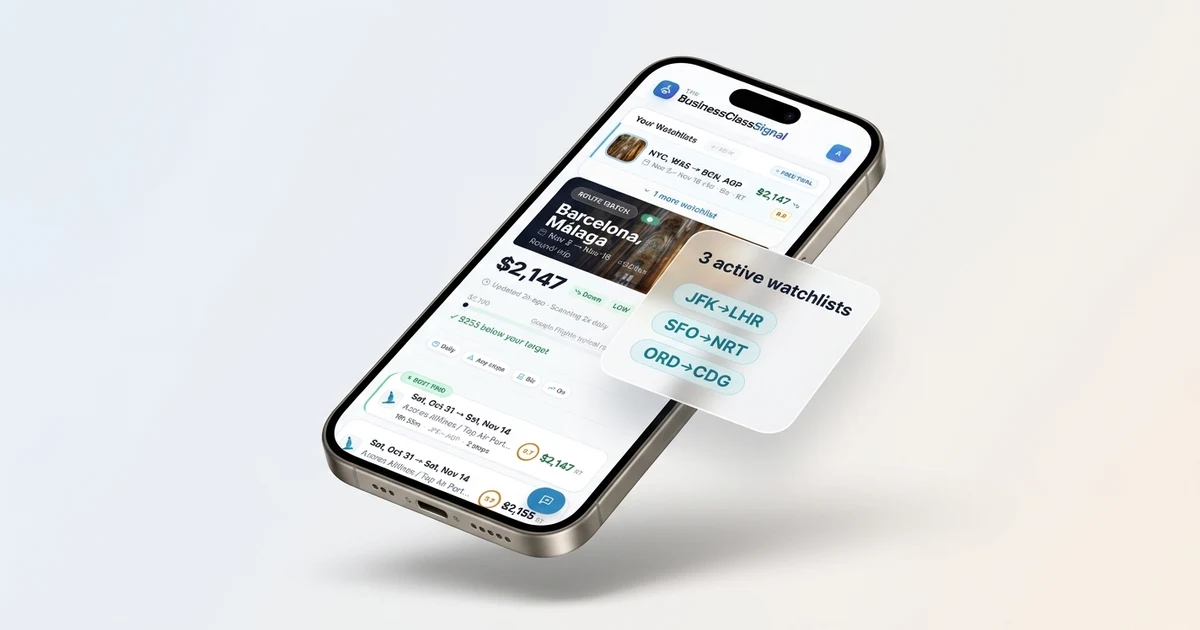
Knowing a price changed is only half the problem. The other half is knowing whether the change is worth telling you about.
A fare going from $3,847 to $3,831 is technically a price drop. Nobody needs an email about that. But a lot of basic alert systems will send one anyway, because they're just watching for the direction of movement rather than the magnitude. You end up with an inbox full of alerts about $16 savings on transatlantic business class, which is how people learn to ignore fare alerts entirely.
Good alert logic has a threshold layer. You set a target price — say, $2,200 round-trip in business class from JFK to Heathrow — and the system only fires when the fare actually crosses that line. This sounds obvious. It's surprisingly rare to find it implemented well.
There's a second layer that matters too: validation. When a price drops, is it actually bookable? Is the inventory real? Fare data can contain phantom availability — fares that show up in the feed but are no longer actually holdable when you try to book. A system that sends you alerts on phantom inventory is wasting your time and eroding your trust in the tool.
When you set your target price, go 15-20% below the average you've seen for that route. If you're watching JFK-LHR business class and you've been seeing it at $3,200-$3,800, set your alert at $2,400 or below. You'll miss some mediocre drops, but you'll only hear from the system when something genuinely good happens.
How fare alert how it works differs across tool types
There are roughly four categories of fare alert tools in the market right now, and they're not interchangeable.
Aggregator alerts (Google Flights, Kayak, Skyscanner) — These are free, they're convenient, and they work reasonably well for economy on mainstream routes. The scan frequency is opaque (Google doesn't tell you how often it checks), the data comes through aggregator pipelines with inherent lag, and the alert logic is basic. For business class, I've found them unreliable. I've gotten Google Flights alerts for fares that were already gone when I clicked through. Airline-direct alerts — Most major airlines let you set up fare alerts on their own sites. The advantage is that you're watching their own inventory directly. The disadvantage is that you need separate alerts on every airline you'd consider flying, you only see that one carrier's fares, and the interfaces are generally clunky. It's not a realistic solution if you're watching multiple routes or flexible on carrier. Deal newsletters — Services like Secret Flying or The Flight Deal are edited by humans who find deals and broadcast them to a mailing list. The quality is high when they catch something good, but you're getting deals that a) are already public and b) are being sent to potentially hundreds of thousands of subscribers simultaneously. The inventory on a business class sale is thin. By the time you see it in a newsletter, there's a real chance the good seats are gone. Dedicated fare monitoring tools — This is where BusinessClassSignal sits. The model is route-specific monitoring, user-defined price thresholds, and fast alerts when something crosses your target. You're not waiting for a human editor to notice a deal. You're not competing with a mailing list of 200,000 people. The system is watching your specific routes and telling you specifically when your price appears.The data problem with business class specifically
I want to spend a minute on why business class fare monitoring is harder than economy, because I think this is underappreciated.
Economy fares on popular routes are liquid. There are hundreds of seats, prices move in relatively predictable ways, and the inventory is deep enough that even a 6-hour-old price signal is often still valid when you go to book. Business class is the opposite. You're talking about 20, 30, maybe 40 seats on a widebody. A discounted business class fare might represent 2-4 seats of actual availability. When that inventory sells, it's gone.
The pricing logic is also more complex. Business class fares are bucketed into fare classes (J, C, D, I, Z on most carriers, though every airline has its own lettering system), and each bucket has different availability, different refundability, different upgrade eligibility, and different mileage earn rates. A fare alert that just watches the headline price without tracking which fare bucket it's in can lead you into a booking that looks right but doesn't behave the way you expected — no upgrades, no earning, restricted changes.
Fare class matters more than people realize
That "business class" fare at $1,800 might be a Z-class or I-class fare — the bottom of the business cabin inventory. You'll get the seat and the lie-flat bed, but you might earn 50% of the miles you'd earn on a full J fare, and the change fees could be punishing. Worth knowing before you book.
When do business class fares actually drop?
I get asked this constantly, and the honest answer is: more randomly than anyone wants to admit. But there are patterns worth knowing.
Schedule change windows are one of the best times to watch. When airlines file new schedules (typically twice a year, around March/April and October/November), they sometimes reprice routes aggressively to stimulate early booking on newly opened inventory. I've seen some of the best transatlantic business class fares appear in the first 48-72 hours after a schedule opens.
Close-in inventory — inside 21 days of departure — is another window. Airlines would rather fill a seat at a steep discount than fly it empty. The tradeoff is you're booking late, which doesn't work for everyone, but if you have flexibility, close-in is worth watching.
Tuesday and Wednesday have a historical association with cheaper fares, and while the effect is less pronounced than it used to be, it's not entirely myth. Airlines often file new fares on Monday evening, and matching fares from competitors appear Tuesday and Wednesday. I've found Thursday evening to Friday morning is actually a window I watch — airlines sometimes adjust pricing before the weekend and there's a brief period of interesting inventory.
The other thing I'd say: stop thinking about annual sales as the main event. Airlines like to make noise about "sale fares," but in my experience, the best business class prices I've seen have appeared randomly, with no announcement, for a few hours, on routes you wouldn't have thought to watch. That's exactly the scenario where a monitoring tool earns its keep — because no amount of manually refreshing Google Flights is going to catch a 4-hour window on a Thursday afternoon.
If you're flexible on departure date by even 3-4 days, set your alert to watch a date range rather than a single date. Business class inventory drops are almost never across the whole month — they're usually specific departures where the airline has unsold seats. Widening your window dramatically increases the chance you'll see something.
How fare alert how it works at BusinessClassSignal

I'll be specific, because I think people deserve specifics rather than vague claims about "powerful technology."
When you set up a route alert on BusinessClassSignal, you're telling the system: watch this origin, this destination, this cabin class, and alert me when the price drops below this threshold. The system then monitors that route on its scan schedule — twice daily as a baseline, more frequently for routes that show high price volatility or are within 30 days of departure.
Each scan pulls fare data from multiple sources: GDS feeds, airline direct channels where available, and aggregator data as a cross-reference. When a price appears that's below your threshold, the system runs a validation pass — checking that the fare is actually bookable, that the inventory count is above zero, and that the fare rules match what a reasonable person would expect (so we're not alerting you to a 24-hour advance-purchase fare that you've already missed the window on).
If it passes validation, you get an alert. Email by default, with enough information to act: the fare, the fare class, the booking window, and a link to check availability. The goal is that you can read the alert and know within 30 seconds whether it's worth pursuing.
Start monitoring your route and you'll have alerts running within a few minutes of setup. There's a 14-day free trial, no card required, and you can browse all the routes we cover before you commit to anything.What fare alerts can't do
I'd be doing you a disservice if I made this sound like a solved problem.
Fare alerts — including ours — are reactive, not predictive. We can tell you when a price drops. We cannot reliably tell you that a price will drop next Tuesday. Predictive pricing tools exist, and some are decent for economy on high-volume routes, but for business class the sample sizes are too small and the pricing logic too opaque for predictions to be meaningfully reliable. Anyone claiming to accurately predict business class fare drops is overselling it.
There's also the booking execution problem. An alert fires. You get the email. You click through. And the fare is gone. This happens. It happens less often when the system is fast and the validation is good, but it happens. Business class inventory is thin enough that even a 20-minute lag between alert and action can be too long on a hot deal. If you set up an alert and actually want to book when it fires, have your payment details ready and know which cabin you want before you need to move.
And alerts don't replace judgment. A $1,800 business class fare to Tokyo sounds incredible until you notice it's routing through three airports with a 9-hour layover in a connection city you'd never choose. The alert tells you a price threshold was crossed. You still have to evaluate whether the specific itinerary makes sense.
Build a shortlist before you need it
Before you set an alert, spend 20 minutes deciding which airlines you'd actually fly on that route, which routings you'd accept, and what your minimum connection time is. When an alert fires, you want to be able to evaluate it in 2-3 minutes, not start from scratch.
Getting the most out of fare alert how it works in practice
After twelve years of watching this space, here's what I'd actually tell a friend who's setting up their first business class fare alert.
Watch fewer routes, more closely. The temptation is to set up alerts on every route you've ever vaguely considered flying. You'll end up with a flood of alerts, you'll stop reading them carefully, and you'll miss the one that actually matters. Pick two or three routes you're genuinely ready to book on short notice.
Set your threshold honestly. If you need to book 8 weeks out because of work commitments, don't set an alert for close-in fares that you can't actually use. Match the alert parameters to your real booking behavior, not your fantasy booking behavior.
Check the how-it-works page when you set up a new route — there's specific information about scan frequency per region, which carriers we have direct data feeds for, and how to interpret the fare class information in the alert emails. It's not glamorous reading but it'll save you confusion later.
And when an alert fires — move. Don't sit on it for a day. Don't forward it to your travel agent and wait to hear back. Business class deals at the prices worth alerting on don't survive 24 hours. If you're not in a position to act within a few hours of receiving an alert, fare monitoring probably isn't the right tool for your travel style. There's no shame in that. It's just useful to know before you set expectations.
When business class fares are most likely to drop goes deeper on the timing patterns if you want to optimize your monitoring setup further.The technology works. The alerts fire. But the tool is only as useful as the person on the other end who's ready to act when something real appears.
Monitor your route — BusinessClassSignal scans 800+ business class routes and alerts you the moment your target price appears. 14-day free trial, no card required.
Try Free